
How Nuvera Brings Fiber Internet to Your Home or Business
Quick answer: Nuvera installs fiber internet in seven main stages—from announcing a build area and notifying residents to burying the mainline, running a service drop to your property, and installing the equipment inside your home. The full process delivers speeds up to 8 Gig, 99% reliability, and unlimited data, with no construction or equipment charges when you sign up during the construction phase.
Fiber internet is coming to neighborhoods across southern Minnesota, and many residents want to know exactly what to expect when the crews arrive. The good news? Nuvera handles the heavy lifting—from the mainline running down your street to the small terminal that powers your Wi-Fi inside.
This guide walks you through each step of the process, so you know what’s happening on your block, what you’re responsible for, and how to get connected. Whether you run a household full of streaming devices or a business that depends on fast, dependable uploads, here’s how Nuvera fiber internet reaches your door.
What Is Fiber Internet, and Why Does It Matter?
Fiber-optic internet uses thin strands of glass to transmit data as pulses of light. That technology is what makes fiber so fast and so reliable compared to older cable or wireless connections.
Here’s what Nuvera fiber delivers:
- Speeds up to 8 Gig to power demanding households and growing businesses
- Equally fast upload and download speeds, ideal for video calls, file sharing, and backups
- A 99% reliable network that holds steady even with many devices connected
- Unlimited data with no caps and no overage fees
- A dedicated connection that won’t slow down from neighborhood congestion like 5G wireless providers
For a business, that means smooth point-of-sale transactions, reliable video conferencing, and room to scale. For a home, it means 4K streaming, gaming, and remote work happening at the same time without lag.
Step 1: Nuvera Announces the Build Area and Notifies Residents
The process starts well before any crews show up. Nuvera reaches an agreement with city officials to expand its fiber footprint and use local utility easements. Once a build area is set, Nuvera notifies the residents and businesses who qualify.
A quick note on equipment: to use fiber internet, you’ll need fiber equipment installed at your property. When that equipment is installed during the construction phase, there is no charge to the property owner. Signing up early is the simplest way to secure free installation.
Step 2: Construction Planning and Pre-Work Communications
Next, Nuvera’s construction crews plan the fiber route and prepare for the build. Most of this work happens on public utility easements—strips of land that run along the street, sidewalk, and rear lot lines, or between two properties.
You won’t be left guessing about timing. Before work begins near your home, you’ll receive a letter, a door hanger, and other communications with construction details. In some cases, crews may need your help accessing an easement, especially if it falls within a fenced yard.
Step 3: Utility Line Marking—Public and Private
Before any fiber goes in the ground, existing utility lines need to be located so nothing gets damaged. Public utilities will mark your lawn with paint and flags to show where their lines run. Please leave these markings in place—flags are removed after construction, and paint fades on its own.
This step comes with an important responsibility for property owners. You must arrange to have private lines marked yourself. That includes:
- Sprinkler and irrigation systems
- Underground dog or invisible fences
- Sump pump lines
Nuvera and public utility companies do not locate these private facilities. For guidance, visit gopherstateonecall.org/homeowners.
Step 4: Burying the Underground Fiber-Optic Lines
With everything marked, the crew gets to work. The Nuvera construction team uses a vibratory plow to bury the underground fiber-optic lines from a pedestal or cabinet in your area. The crew digs a hole just large enough to fit the cable.
The cable is typically plowed to a depth of 12 to 18 inches, which keeps disturbance to your lawn at a minimum. After the cable is in place, the grass is restored on top.
Restoration happens in two parts. First, crews fill any holes with sand, allowing the area to settle and stay safe for children and pets. Once construction wraps up, the contractor returns to finish the job with black dirt, topsoil, and grass seed. (If you fertilize the new seed, choose a product without weed killer.)
Step 5: Connecting Fiber from the Mainline to Your Property
Once plowing activities are complete, Nuvera buries the fiber facilities that run from the mainline directly to your home or business. This is the service drop—the link that brings the network from your street to your property.
Step 6: Installing the Network Interface Device (NID)
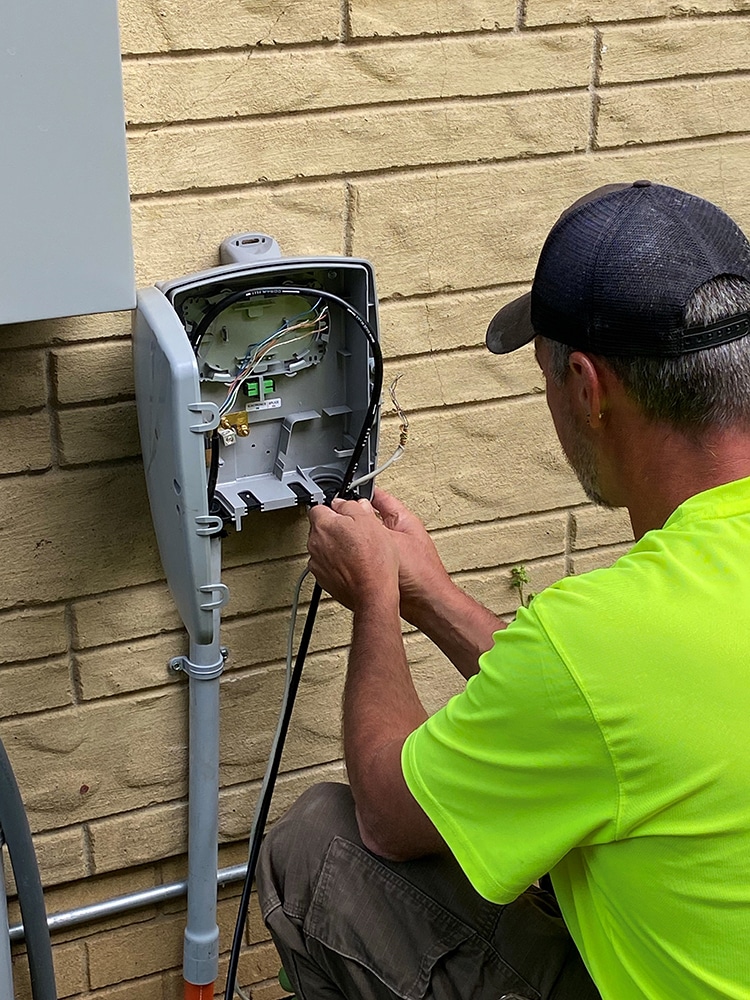
The crew then connects the fiber-optic cable to the Network Interface Device, or NID, mounted on the outside of your home or business. The NID is the equipment that ties your property to the Nuvera fiber network. It’s the bridge between the buried cable outside and the equipment that will go inside.
Step 7: Installing the Optical Network Terminal (ONT) Inside Your Home
The final step happens indoors. A Nuvera technician installs a fiber Optical Network Terminal, or ONT, inside your home and connects it to the fiber on the outside. The ONT converts the light signals traveling through the fiber into the internet connection your devices use.
Once the ONT is in place and connected, your fast, reliable fiber internet is ready to go.
How to Get Started or Learn More
The best time to connect is while crews are already working in your area, since installation costs are waived for households and businesses that sign up before or during local construction. Wait too long, and you may face longer lead times once the crews move on.
Ready to find out if fiber is available at your address? Call or text Nuvera’s Customer Solution Centers at 844.354.4111, or visit getnuvera.com/fiber to check availability and get started.
Related Articles

Your business runs on the internet every day. Your team uses it to communicate, collaborate and serve customers. Your customers rely on it to connect […]

Today’s schools rely on technology more than ever before. From digital learning and online testing to livestreaming extracurricular events and protecting student data, dependable technology […]

Growing a business today means balancing operations, security, and competitiveness all at once. Cyberthreats grow more sophisticated every year. Compliance rules keep shifting. And downtime […]